എന്തിന്നധീരത ഇപ്പോൾ തുടങ്ങുവിൻ

കവിത കേൾക്കുക:[ca_audio url=”https://chayilyam.com/stories/poem/enthinnadheeradha.mp3″ width=”400″ height=”27″ css_class=”codeart-google-mp3-player” autoplay=”false”]

നാളെ നേതാക്കളായി മാറേണ്ട നിങ്ങള്‍ക്ക്
കാലം അമാന്തിച്ചു പോയില്ലാ… (2)

നിങ്ങള്‍ പഠിക്കുവിന്‍… നിങ്ങള്‍ പഠിക്കുവിന്‍…
ആദ്യക്ഷരം മുതല്‍ മേലോട്ട് (2)

ബാലപാഠങ്ങള്‍ പഠിച്ചോളിന്‍
മതിയാകില്ലെങ്കിലും നന്നായ് പഠിച്ചോളിന്‍… (2)

എന്തിന്നധീരത? ഇപ്പോൾ തുടങ്ങുവിൻ
എല്ലാം നിങ്ങൾ പഠിക്കേണം
തയ്യാറാകണം ഇപ്പോള്‍ തന്നെ,
ആജ്ഞാശക്തിയായി മാറീടാൻ… (3)

നാടു കടത്തപ്പെട്ടവരേ…
തടവിലടയ്ക്കപ്പെട്ടവരേ…
എന്നും അടുക്കളക്കുള്ളില്‍
കുടുങ്ങിയൊതുങ്ങിയിരിക്കും വീട്ടമ്മമാരെ…
വാര്‍ദ്ധക്യപെന്‍ഷന്‍ വാങ്ങിയിരിക്കും
വന്ദ്യവയോധികരേ…

എന്തിന്നധീരത? ഇപ്പോൾ തുടങ്ങുവിൻ
എല്ലാം നിങ്ങൾ പഠിക്കേണം
തയ്യാറാകണം ഇപ്പോള്‍ തന്നെ
ആജ്ഞാശക്തിയായി മാറീടാൻ… (2)

പാര്‍പ്പിടമില്ലാത്ത പാവങ്ങളേ…
മഞ്ഞില്‍ കോച്ചിയിരിപ്പവരേ…
വിദ്യാശാലയും വിജ്ഞാനങ്ങളും
അന്വേഷിക്കുവിന്‍ കൂട്ടരേ… (2)

പട്ടിണിയായ മനുഷ്യാ നീ
പുസ്തകം കയ്യിലെടുത്തോളൂ…
പുത്തനൊരായുധമാണു നിനക്കത്
പുസ്തകം കയ്യിലെടുത്തോളൂ… (2)

എന്തിന്നധീരത? ഇപ്പോൾ തുടങ്ങുവിൻ
എല്ലാം നിങ്ങൾ പഠിക്കേണം
തയ്യാറാകണം ഇപ്പോള്‍ തന്നെ
ആജ്ഞാശക്തിയായി മാറീടാൻ…

ചോദ്യം ചെയ്യാന്‍ ഭയക്കാതിരിക്കുവിന്‍
മൂഢവിശ്വാസങ്ങള്‍ തള്ളിക്കളയുവിന്‍
തന്നത്താനെ പഠിക്കാതെയൊന്നും
അറിയില്ല നിങ്ങള്‍ സഖാക്കളേ… (2)

ഓരോ ചെറുചെറു വസ്തുവിലും
വിരല്‍ തൊട്ടു തൊട്ടങ്ങു ചോദിക്കൂ!!
എങ്ങനെയിതു കിട്ടീ നിങ്ങള്‍ക്ക്? (2)

എന്തിന്നധീരത ഇപ്പോൾ തുടങ്ങുവിൻ
എല്ലാം നിങ്ങൾ പഠിക്കേണം
തയ്യാറാകണം ഇപ്പോള്‍ തന്നെ
ആജ്ഞാശക്തിയായി മാറീടാൻ…(2)

About Me

Rajesh K
Sr. Software Engineer at CareerNet Technologies, Bangalore

I am a very positive, diverse, intelligent, and independent man with an amazing outlook on life and a great sense of humor. I would describe myself as fun, well mannered, confident, driven, successful, intellectual, and sophisticated. I am romantic, have a great sense of humor and am very caring. I am non judgmental, accepting, and value people for who not what they are. I am very social, outgoing  and playful. Very passionate, laid back, sensual, sensitive and very loyal. I am not the jealous type and believe you keep what you set free. Honesty, ethics, integrity, and always doing the right thing – even when no one is watching are important.

 I love art, culture, and music. I pride myself in being flexible, malleable, and open. I work hard and play hard. I adapt well to all situations. I am well cultured, well traveled, and have a heightened sense of awareness and appreciation for others. My goals in life are to grow, learn, experience, and challenge myself. I am a perfect dichotomy of rugged and compassionate, serious and carefree, and business and pleasure. I can party like a rock star and still keep it together.

I love the finer things in life but I am also very humble, appreciative, and will never forget my roots. Balance and moderation are essential components to a happy and healthy existence. I am an amazing listener and excellent communicator. I believe it is important to ameliorate my ideas, successes, shortcomings, and beliefs often.

I live my life by the following: You can sleep when you are dead. We miss 100 percent of the shots we don’t take and once we are satisfied we never get better. Time is the only asset in life you can never get back or recover. I am never afraid to take a chance and rarely miss an opportunity.

Software Development:
Its my passion, I can’t live without them. As being a computer science student, I have developed some software while my academic activities in C programming Language and Visual Basic also. I have developed many projects using Visual Basic and Oracle in my First Company. 

Web Designing:
Website always passionate me since I visited first website in my life. I always dream to make own site some day. So finally the come into my life and now I have developed many of the websites. Interesting thing about behind my website  designing was that, the day which i have planned for my website that day i was nil in web designing the will power inside me which provoked me to go for it and at last i achieved my goal.

Graphics Designing:
As I have interest in the field of drawing and painting, and being computer as my carrier I use to do graphics works. I m a self taught graphics… I have done a lot of graphics work. I use to do work in Photoshop, Corel, and illustrator. I have done different projects for different companies. I  have designed logos, CD covers, posters, banners for many firms and society, as well as many company presentations templates.
Painting:
Painting is my main hobby which I started doing from the age of 12 years. I use to do painting in different ways and mediums like water color, oil color, acrylic colors and mix media. My strong part in painting is water color in which I really love to work.

Photography:
I have also a deep interest in the field of photography; it’s just a part of my hobby which allows me to capture some exciting moments. In this I generally love to shoot nature, wildlife, compositions.

A Message to art students:
The art of painting is a mysterious activity. That is why I believe there is nothing like modern art or Fine art, Indian art or western art – there is just art. An artist draws and paints for his own satisfaction. What he paints & how he paints is entirely a matter of his personal choice. It is often said that art is visual poetry, I think it’s also music, where harmony, balance, rhythm are very important.
Interest and involvement are the two important things for the study of art. Art can be learn – provided you have tremendous interest in the subject. And a sense of involvement will definitely solve the different problems which you have to face while studying art. There are various things are a part of its vocabulary. Just like music art too requires rigorous practice – I don’t think there is any short cut in this field. And if your interest in art becomes a part of you, then it helps to accelerate your progress. Because art is not a means, to attain an end – it is an end in itself. When you reach that mental state where art becomes your passion, your life, then you are free. You are then like a bird, soaring in the sky of joy.

Thank you!

Rajesh K Odayanchal

ഗുഹാന്തര

Guhantara Bangalore, ഗുഹാന്തര ബാഗ്ലൂർ
ഗുഹാന്തര റിസോർട്ടിനവശം, ബാഗ്ലൂർ

ഇതൊരു ടീം ഔട്ടിങിന്റെ കഥയാണ്. മുമ്പ്, സാമ്പത്തിക മാന്ദ്യം ബാംഗ്ലൂരിനേയും ലോകത്തേയും ഒക്കെയിട്ടിങ്ങനെ കഷ്ടപ്പെടുത്തുന്നതിനു ഒന്നോ രണ്ടോ മാസം മുമ്പ് കമ്പനിയില്‍ നിന്നും ഞങ്ങള്‍ അവസാനമായി നടത്തിയ ഒരു ഔട്ടിങിന്റെ കഥ. അതിനുമുമ്പ് ഓരോ ആറുമാസം കൂടുമ്പോഴുമുണ്ടാവുമായിരുന്നു ഇതുപോലുള്ള യാത്രകള്‍. ബാംഗ്ലൂരിന്റെ അല്പം ഔട്ടറിലായി, പണ്ട് വീരപ്പന്റെ സാമ്രാജ്യമായിരുന്ന സത്യമംഗലം വനാതിര്‍ത്തിയിലുള്ള‌ ഗുഹാന്തര [guhantara] എന്നൊരു അണ്ടര്‍ഗ്രൌണ്ട് റിസോര്‍ട്ടിലേക്കായിരുന്നു ഞങ്ങള്‍ അന്നു പോയത്. പത്തമ്പതുപേരുണ്ടെങ്കിലും ഞങ്ങളുടെ ഗ്രൂപ്പില്‍ ഒരൊറ്റ പെണ്‍കുട്ടി പോലുമില്ല. ഇല്ലാന്നല്ല, അന്നേരം ടീമിലുണ്ടായിരുന്ന ഒരേയൊരു പെണ്‍കുട്ടി ആതിര നായര്‍ ആയിരുന്നു. അവളീ പ്രോഗ്രാമിനു വന്നിട്ടുമില്ല.

രാവിലെതന്നെ ഞങ്ങള്‍ ഗുഹാന്തര റിസോര്‍ട്ടില്‍ എത്തി. ഡാകിനിയമ്മൂമ്മയുടെ ഗുഹാമുഖം പോലൊരു എന്‍ട്രന്‍സ് മാത്രമേ പുറമേയ്ക്കുകാണാനുള്ളു. മുകളില്‍ ഒരു വലിയ പ്രദേശമപ്പാടെ മുള്ളുവേലിയാല്‍ മറച്ചുവെച്ച ഒരു പാര്‍ക്കുപോലെ തോന്നിച്ചു. അടുത്തെങ്ങും ഒരു വീടുപോലുമില്ല. തികച്ചും വിജനമായ പ്രദേശം. അധികമകലെയല്ലാതെ ഫോറസ്റ്റ്. അങ്ങിങ്ങായി ആടിനേയും പശുവിനേയുമൊക്കെ മേയ്‍ച്ചു നടക്കുന്ന ചില ഗ്രാമീണവാസികള്‍. ആ ഗുഹാമുഖവും തുടര്‍ന്നുള്ള വഴികളുമൊക്കെ കണ്ടാല്‍ കൃത്രിമമായുണ്ടാക്കിയതാണെന്നു പറയില്ല‌. അതിലൂടെ കേറിയാല്‍ നീണ്ടുനീണ്ടുപോകുന്ന വഴിയില്‍, ഇടവിട്ടിടവിട്ട് വിളക്കുകളുണ്ട്. ശ്വാസം കിട്ടാന്‍ വേണ്ടിയാവാം ഇടയ്‍ക്കൊക്കെ മുകളിലേക്ക് ചെറിയ ചെറിയ ദ്വാര‌ങ്ങളുമുണ്ട്. അതിലൂടെ സൂര്യപ്രകാശം ഉള്ളിലേക്കു കയറുന്നുണ്ടായിരുന്നു. ആ യാത്ര അവസാനിക്കുന്നത് സാമാന്യം വലിയൊരു ഹാളിലേകാണ്. മുകളിൽ കൊടുത്തിരിക്കുന്ന ചിത്രം കാണുക; അതുതന്നെ ഹാൾ…

സൈഡിലൊരു കൊച്ചു സ്വിമ്മിങ്‍ പൂളുണ്ട്. അതിനുനടുവിലൂടെ മുളകൊണ്ടുതീര്‍ത്തൊരു കൊച്ചുപാലം. ചുമരുകളൊക്കെ പുരാതനകാലത്തെ കൊത്തുപണികളെ ഓര്‍മ്മിപ്പിക്കുന്ന കലാവിരുന്നുകള്‍. എല്ലാം ആര്‍ട്ടിഫിഷ്യലാണ്. ആ ഹാളിന്റെ മറ്റുസൈഡുകളിലൊക്കെയായി ഒരുപാടു ഗുഹാവഴികളുണ്ട്. രാത്രിയുറക്കത്തിനുള്ള മുറികളും ആധുനിക കളികളായ ടേബിള്‍ടെന്നീസും മറ്റും കളിക്കാനുള്ള പ്ലേറൂമുകള്‍, ഭക്ഷണം കഴിക്കാനുള്ള മുറികള്‍ എന്നുവേണ്ട എല്ലാമുണ്ടവിടെ. ഇടയ്‌ക്കൊക്കെ ആകാശം കാണാനുള്ള മുകളിലേക്കുള്ള വാതായനങ്ങള്‍. ഒരു വലിയ ഹോട്ടല്‍. എല്ലാം ഭൂമിക്കടിയില്‍! ഓരോ മുറികള്‍ക്കും പേരിട്ടിരിക്കുന്നത് സംസ്‍കൃതത്തിലാണ്, ഭോജനശാല, നാട്യശാല, ശൌച്യാലയം എന്നൊക്കെ. രാഗമണ്ഡപവും സാമവാദശാലയുമുണ്ടവിടെ.

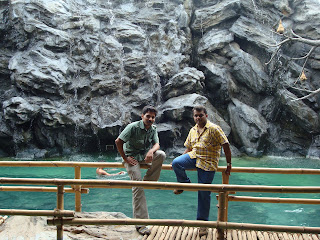
സ്വിമ്മിങ്പൂളിനു മുന്നിൽ…

ഞങ്ങള്‍ എല്ലാം നടന്നുകണ്ടു. അപ്പോഴേക്കും ബാംഗ്ലൂരിലെതന്നെ പ്രശസ്തങ്ങളായ രണ്ട് MNC- കളില്‍ നിന്നായി ഒരു വലിയ പടതന്നെ അവിടേയ്‍ക്കു വരികയുണ്ടായി. നല്ല നല്ല മലയാളച്ചന്തങ്ങള്‍ ചന്ദനക്കുറിയണിഞ്ഞു വരുന്നതുകണ്ടപ്പോള്‍ ഞങ്ങള്‍ക്കും അല്പം ആശ്വാസം. തൃശ്ശൂര്‍കാരനായ പ്രേമും ഞാനുമായിരുന്നു ഒന്നിച്ചുണ്ടായിരുന്നത്. ഞങ്ങളാ മലയാളിക്കുട്ടികളെ പരിചയപ്പെട്ട് അല്പം വര്‍ത്തമാനമൊക്കെ പറഞ്ഞിരിക്കുമ്പോള്‍ ദൂരെ ഹാളിനടുത്തുനിന്നും തമിഴന്‍ ഗുണശേഖരന്‍ വിളിക്കുന്നതുകണ്ടു. ഞങ്ങള്‍ അങ്ങോട്ടു ചെന്നപ്പോള്‍ വെങ്കിടേഷും അവിടെ നില്‍പ്പൂണ്ടായിരുന്നു. അവന്‍ കണ്ണുകൊണ്ട് സ്വിമ്മിങ്‍പൂളിലേക്കു നോക്കാന്‍ ആഗ്യം കാണിച്ചു. അവിടെ ഒരു പെണ്‍കുട്ടി നമ്മുടെ നയന്‍താരയേയും ഷക്കീലച്ചേച്ചിയേയുമൊക്കെ തോല്‍പ്പിച്ചിട്ടേയിനികാര്യമുള്ളൂ എന്നമട്ടില്‍ സ്വിമ്മിങ്‍ഡ്രസ്സില്‍ കിടന്നുപുളയുകയാണ്. അവള്‍ വെള്ളത്തില്‍ ഇരുന്നും കമിഞ്ഞും മലര്‍ന്നുമൊക്കെ നീന്തിക്കളിക്കുന്നു. ഇതുകണ്ടപ്പോള്‍ അങ്ങനെ അവിടെ നിന്നും സീന്‍ പിടിക്കുന്നത് ശരിയല്ലല്ലോ എന്നു തോന്നി. നമുക്കു വലിയ മാന്യന്‍മാരാകാന്‍ കിട്ടിയ ഒരു അവസരമല്ലേ, വെറുതേ പഴാക്കരുതല്ലോ. പക്ഷേ വെങ്കിടേശന്‍ വിട്ടില്ല. അവന്‍ അപ്പോള്‍തന്നെ അവന്റെ ഡ്രസ്സൊക്കെ അഴിച്ചുകൈയില്‍ തന്നു ഒരു ബര്‍മ്മുഡ മാത്രം ധരിച്ച് വെള്ളത്തിലേക്ക് എടുത്തുചാടി. ഗുണശേഖരന്‍ ‘വെങ്കിടേശന്റെ കുളിസ്സീന്‍’ ഒരൂ സെക്കന്റുപോലും കളയാതെ വീഡിയോ ആയും ഫോട്ടോ ആയും പകര്‍ത്തിക്കൊണ്ടിരുന്നു. പക്ഷേ, കൂടെ കുളിക്കുന്ന പെണ്‍കൊച്ചിന് ഒരു കുലുക്കവും ഇല്ലായിരുന്നു.

ഞങ്ങള്‍ മെല്ലെ അവിടെനിന്നും വലിഞ്ഞു. ബാംഗ്ലൂരില്‍ വന്നിട്ട് ഇത്രയൊക്കെയായിട്ടും മനസ്സിനിണങ്ങിയ ഒരു മലയാളിക്കുട്ടിയേയും കണ്ടുകിട്ടാത്തതിലുള്ള വിഷമത്തിലായിരുന്നു ഞാന്‍. അല്പകാലമൊന്നു പ്രേമിക്കണം, പിന്നെ സഖിയായി കൂടെക്കൂട്ടണം. രണ്ടുപേര്‍ക്കും ജോലി കൂടിയുണ്ടെങ്കില്‍ ഇവിടെ കഴിഞ്ഞുകൂടാന്‍ പരമസുഖമാണ്. ഇത്തരം നല്ല ചിന്തകളേയുണ്ടായിരുന്നുള്ളൂ മനസ്സില്‍. അപ്പോഴാണ് മലയാളിചന്തങ്ങളുടെ ഈ അരങ്ങേറ്റം. 🙊

guhanthara ഗുഹയ്ക്ക് വെളിയിലെ കവാടം
ഗുഹയ്ക്ക് വെളിയിലെ കവാടം

ഒരുകുട്ടിയെ അതില്‍ നിന്നും നോക്കിവെച്ചു. നല്ല ഗ്രാമീണത തോന്നിക്കുന്ന ഒരു കുട്ടി. വെളുവെളാന്നു വെളുത്ത ചുരിദാറും ഇട്ടവള്‍ പാറി നടക്കുന്നതു കാണാന്‍ തന്നെയൊരു ഐശ്വര്യമായിരുന്നു. ഇരുട്ടുള്ള ആ ഇടനാഴികളിലെ വെളിച്ചമായിരുന്നു അവള്‍. പേരു ചോദിച്ചു; നാടുചോദിച്ചു. പിരിയാന്‍ നേരമാവുമ്പോള്‍ മൊബൈല്‍ നമ്പര്‍ വാങ്ങിക്കുകയുമാവാം എന്നു കരുതി. അത്യാവശ്യമൊന്നു പഠിച്ചതിനുശേഷം, ആരും പറഞ്ഞുവെച്ചിട്ടില്ലെങ്കില്‍ ഇഷ്ടം അങ്ങോട്ടു തുറന്നുപറയാം. മലര്‍പ്പൊടിക്കാരന്റെ സ്വപ്നം പോലെ ഞാന്‍ മനക്കോട്ടകളുടെ ചിറകിലേന്തി പറന്നു നടന്നു.

ഇവിടെ ബാംഗ്ലൂരുള്ള‌ ഒരുമാതിരി പെണ്‍കുട്ടികള്‍ക്കൊക്കെ ഒന്നോരണ്ടോ കാമുകന്‍‍മാര്‍വെച്ചുണ്ടത്രേ. കേൾവിയാണിത്. ഫ്രീആയിട്ടുള്ള ഒന്നിനെകിട്ടാന്‍ പാടാണ് എന്നാണ് ബാംഗ്ലൂരിന്റെ മനശ്ശാസ്ത്രം അറിയാവുന്ന കൂട്ടുകാര്‍ പറഞ്ഞുതന്നിട്ടുള്ളത്. പിന്നെ ക്രഡിറ്റ്കാര്‍ഡും ബൈക്കുമുണ്ടെങ്കില്‍ പെണ്‍കുട്ടികള്‍ക്കിവിടെ ക്ഷാമവുമില്ലാത്രേ. തനി നാടനായ എനിക്കിതിനോടൊന്നും യോജിച്ചുപോകാന്‍ തീരെ പറ്റുമായിരുന്നില്ല. ബൈക്കോടികാനാണെങ്കില്‍ തീരെ അറിയുകയുമില്ല. ആയ കാലത്ത് നല്ലൊരുപെണ്ണിനെ നോക്കി പ്രേമിച്ചിരുന്നെങ്കില്‍ ഈ വയസ്സാം കാലത്ത് ഇതിന്റെ വല്ല ആവശ്യവുമുണ്ടായിരുന്നോ എന്ന് റൂംമേറ്റിന്റെ കമന്റും ഈ സന്ദര്‍ഭത്തില്‍ ചേര്‍ത്തുവായിക്കാവുന്നതാണ്. അതെന്തെങ്കിലുമാകട്ടെ, എന്തായാലും ഇവളെ പൊക്കണം എന്നു ഞാന്‍ തീരുമാനിച്ചു;  കൂട്ടുകാരുടെ പരാതി മാറ്റുകയുമാവാം. ഇവളങ്ങനെ കൂട്ടുകാര്‍ പറഞ്ഞതുപോലുള്ള‌ പെണ്‍കുട്ടിയൊന്നുമല്ല എന്നു മനസ്സിനെ പറഞ്ഞുപഠിപ്പിച്ചു കൊണ്ടിരുന്നു ഞാന്‍. ബാംഗ്ലൂരില്‍ ഒത്തിരി നല്ല പെണ്‍കുട്ടികളെ ഞാന്‍ കണ്ടിട്ടുണ്ട്. കല്യാണത്തിനുള്ള ക്രൈറ്റീരിയ വരുമ്പോളവിടെയൊക്കെ പ്രശ്നമാവുന്നതുകൊണ്ട് അതൊക്കെ ഒഴിവാക്കി. ഈ കുട്ടിയാവുമ്പോള്‍ കാസര്‍ഗോഡിനടുത്താണ് പയ്യന്നൂരില്‍. ഒരുമണിക്കൂര്‍ യാത്രയേ ഉള്ളു… ഇങ്ങനെ ചിന്തിച്ചു കൂട്ടുകയല്ലാതെ എന്റെ ആയകലാത്തെ പ്രേമമൊക്കെ ഇവരോടു വിളമ്പേണ്ട വല്ല ആവശ്യവും എനിക്കുണ്ടോ!!

ഞങ്ങള്‍ ഉച്ചഭക്ഷണം കഴിച്ചു. വളരെ സുഭിക്ഷമായിത്തന്നെ കഴിഞ്ഞു. വെജും നോണും ഒക്കെയുണ്ടായിരുന്നു. ഞാന്‍ കഴിഞ്ഞ കുറേ വര്‍ഷങ്ങളായിട്ട് വെജിറ്റേറിയനാണ്. കഴിച്ചുകഴിഞ്ഞ ഉടനേ എല്ലാവരും പല കളികളിലായിട്ടേര്‍പ്പെട്ടു. ചെസ്സ്, ക്യാരംസ്… ഇങ്ങനെപോകുന്നു കളികള്‍. അല്പം സമയം കഴിഞ്ഞപ്പോള്‍ ഹാളില്‍ നിന്നും ഏതോ ഹിന്ദിപ്പാട്ടിന്റെ കാതടിച്ചുപോകുന്ന സൌണ്ട് കേള്‍ക്കാന്‍ തുടങ്ങി. അവിടെ ഡാന്‍സ്‌ തുടങ്ങിയിരിക്കുന്നു. എല്ലാവരും അങ്ങോട്ടു ചെന്നു. “റെയിന്‍ ഡന്‍‌സ്‌” എന്നാണത്രേ അതിനുപറയുക. ഞാനാദ്യമായിട്ടാണിങ്ങനെ ഒരു ഡന്‍സിനെപ്പറ്റി കേള്‍ക്കുന്നതും കാണുന്നതും. സിനിമയിലൊക്കെ കണ്ടിട്ടുണ്ട് എന്നല്ലാതെ… മുമ്പൊരിക്കല്‍ ഒരു കൊടൈക്കനാല്‍ ട്രിപ്പില്‍ “ഫയര്‍ ഡാന്‍സി“നെ പരിചയപ്പെട്ടിരുന്നു. ഇത് അതിന്റെ മറ്റൊരുരൂപം ഡ്യൂപ്ലിക്കേറ്റായി മഴയുണ്ടാക്കി അതിനുകീഴെനിന്നും വൃത്തികെട്ട ശരീരചലനങ്ങളോടെ ആണുംപെണ്ണുമൊക്കെ ഒന്നിച്ചു തുള്ളുക, കൈകോര്‍ത്തുപിടിച്ച്‍ വട്ടത്തിലോടുക, കാലുതട്ടിയിട്ടെന്നപോലെ കെട്ടിമറിഞ്ഞുവീഴുക‌ ഇതൊക്കെയാണ് അവിടെ അന്നരങ്ങേറിയ ഈ “മഴനൃത്തം“.

ഞങ്ങളും അങ്ങോട്ടുചെന്നു. ഡാന്‍സ് തകര്‍ത്തു പെയ്യുകയാണ്. സൈഡില്‍ ചേട്ടന്‍‍മാരുടേയും ചേച്ചിമാരുടേയും പേക്കൂത്തുകളൊന്നും ശ്രദ്ധിക്കാതെ ഒരു നാലുവയസ്സുകാരന്‍ പയ്യനും ഡാന്സുകളിക്കുന്നുണ്ടായിരുന്നു. അവന്‍ അമ്മയെ തന്റെ ഡാന്‍സുകാണിച്ച് അവരെക്കൂടി കളിക്കാന്‍ പ്രേരിപ്പിക്കുകയായിരുന്നു. ഓരോ പാട്ടും ഒന്നിനൊന്നു കര്‍ണകഠോരങ്ങളായിരുന്നു. ഡാന്‍സില്‍ മുറുകി ഓരോ ആളും വിഭ്രാന്തിയിലെന്നപോലെ ചലിക്കുകയാണ്.

വിഷമത്തോടെ എനിക്കുകാണേണ്ടിവന്നു; ആ ചടുലതാളപ്പുളപ്പില്‍, ചന്ദനക്കുറിതൊട്ടുവന്ന ആ മലയാളിത്തനിമയും നനഞ്ഞൊട്ടിയ വസ്ത്രവുമായി, ഉറയ്‍ക്കാത്ത ചുവടുകളോടെ ആള്‍ക്കൂട്ടത്തില്‍ മിന്നിമറയുന്നു. നടനവൈകൃതത്തിന്റെ കളിയരങ്ങില്‍ അവള്‍ ആടിത്തിമര്‍ക്കുകയാണ്. ആണുങ്ങളില്‍ ചിലര്‍ ബനിയനിട്ടിട്ടുണ്ട്. ചിലര്‍ ട്രൌസര്‍ മാത്രം. പെണ്‍കുട്ടികളിലധികവും ടീ ഷര്‍ട്ടുപോലുള്ള പേരറിയാത്ത എന്തൊക്കെയോ വസ്ത്രങ്ങളാണീട്ടിരിക്കുന്നത്. ചിലര്‍ക്കതുപേരിനുമാത്രം. മണിക്കൂറുകളോളം നീണ്ടുനിന്നു ആ പരിപാടി. അതുവെറുമൊരു റിഹേഴ്‍സല്‍ മാത്രമായിരുന്നുവത്രേ..! രാത്രി ഭക്ഷണത്തിന്റെ സമയത്താണ് ശരിയായ ഡാന്‍സുവരിക. എന്തോ, അതുകൂടികാണാനുള്ള ഭാഗ്യമുണ്ടായില്ല. ഞങ്ങളുടേത് ഒരു വണ്‍ഡേ ട്രിപ്പായിരുന്നു. ഗൂഗിളെടുത്ത് guhantara bangalore എന്നു സേര്‍ച്ചുചെയ്താല്‍ നിങ്ങള്‍ക്കുകാണാവുന്നതാണ് ആ റിസോര്‍ട്ടിന്റെ വിശദവിവരങ്ങള്‍, ചിത്രങ്ങള്‍ സഹിതം.

അന്നു നിര്‍ത്തിയതാണെന്റെ മലയാളച്ചന്തം തേടിയുള്ള തെരച്ചില്‍. ഈയിടെ കമ്പനിയില്‍ പുതിയതായി വന്ന ഒരു പെണ്‍കുട്ടി അവളുടെ കൂട്ടുകാരനോട് “ദാ ഇദ്ദേഹത്തിന് ആക്‍സഞ്ചറിലൊരു പെണ്‍കുട്ടിയെ കണ്ടെത്താമോ” എന്നു ചോദിച്ചപ്പോള്‍ വീണ്ടുമോര്‍ത്തുപോയി ഞാനിതൊക്കെ.

ആരേയും കുറ്റപ്പെടുത്താനായിട്ടെഴുതിയതല്ല. നാടോടുമ്പോള്‍ അതിന്റെ നടുവില്‍ കൂടെ തന്നെ ഓടണം. അല്ലെങ്കില്‍ ഒറ്റപ്പെട്ടുപോകും. കൂടുകാരെവിളിച്ച് ഇടയ്ക്കിടയ്ക്ക് വീശിയില്ലെങ്കില്‍, ഫോറത്തില്‍ പോയി വായിനോക്കിയില്ലെങ്കില്‍ വിലകൂടിയ സിഗരറ്റുപാക്കുകള്‍ കൈയിലില്ലെങ്കില്‍ അവധിദിവസങ്ങളില്‍ ഉച്ചയ്ക്കു 12 മണിവരെ കിടന്നുറങ്ങിയില്ലെങ്കില്‍ ഇതിനൊക്കെ സമാധാനം പറഞ്ഞു മടുത്തുപോകും. അതാണു ബാംഗ്ലൂര്‍…! വഴിപിഴച്ച ജന്മങ്ങളുടെ വിഴുപ്പുചാലായി ഇവിടെ വന്നെത്തുന്നവർ നിമിഷമ്പ്രതി മാറ്റിക്കൊണ്ടിരിക്കുന്ന നഗരം. നല്ലതേത്‍ ചീത്തയേതെന്നു തിരിച്ചറിയാനാവാതെ മാറിനിന്നുകാണുക മാത്രമേ എന്നേപ്പോലുള്ളവര്‍ക്കു വിധിച്ചിട്ടുള്ളൂ… അതിനും അതിന്റേതായൊരു രസമുണ്ട്!!

File Formats

Almost Every file

format in the world!

A

A B CD

E F G H

I J K LM

N OP Q

R S T U

V W XY

Z No#


ABK Corel Draw AutoBackup
ACL Corel Draw 6 keyboard accelerator
ACM Used by Windows in the system directory
ACP Microsoft Office Assistant Preview file
ACT Microsoft Office Assistant Actor file
ACV OS/2 drivers that compress and decompress audio data
AD After Dark screensaver
ADB Appointment database used by HP 100LX organizer
ADD OS/2 adapter drivers used in the boot process
ADM After Dark MultiModule screensaver
ADP Used by FaxWorks to do setup for fax modem interaction
ADR After Dark Randomizer screensaver
AFM Adobe font metrics
AF2 ABC Flowchart file
AF3 ABC Flowchart file
AI Adobe Illustrator drawing
AIF Apple Mac AIFF sound
ALB JASC Image Commander album
ALL Arts & Letters Library
AMS Velvert Studio music module (MOD) file
ANC Canon Computer Pattern Maker file that is a selectable

list of pattern colors

ANI Animated Cursor
ANS ANSI text
API Application Program Interface file; used by Adobe Acrobat
APR Lotus Approach 97 file
APS Microsoft Visual C++ file
ARC LH ARC (old version) compressed archive
ARJ Robert Jung ARJ compressed archive
ART Xara Studio drawing
ART Canon Crayola art file
ASA Microsoft Visual InterDev file
ASC ASCII text
ASD WinWord AutoSave
ASM Assembler language source file
ASP Active Server Page (an HTML file containing a Microsoft

server-processed script)

ASP Procomm Plus setup and connection script
AST Claris Works “assistant” file
ATT AT&T Group 4 bitmap
AVI Microsoft Video for Windows movie
AWD FaxView document

B

Top

A B CD

E F G H

I J K LM

N OP

Q

R S T

U

V W XY

Z No#

BAK Backup file
BAS BASIC code
BAT Batch file
BFC Windows 95 Briefcase document
BG Backgammon for Windows game
BI Binary file
BIF GroupWise initialization file
BIN Binary file
BK Sometimes used to denote backup versions
BK$ Also sometimes used to denote backup versions
BKS An IBM BookManager Read bookshelf
BMK An A bookmark file
BMP Windows or OS/2 bitmap
BM1 Apogee BioMenace data file
BRX A file for browsing an index of multimedia options
BSP Quake map
BS1 Apogee Blake Stone data file
BTM Batch file used by Norton Utilities
B4 Helix Nuts and Bolts file

C

Top

A B CD

E F G H

I J K LM

N OP

Q

R S T

U

V W XY

Z No#

C C code
CAB Microsoft cabinet file (program files compressed for

software distribution)

CAL CALS Compressed Bitmap
CAL Calendar schedule data
CAS Comma-delimited ASCII file
CAT IntelliCharge categorization file used by Quicken
CB Microsoft clean boot file
CCB Visual Basic Animated Button configuration
CCF Multimedia Viewer configuration file used in OS/2


CCH

Corel Chart
CCM Lotus CC:Mail “box” (for example, INBOX.CCM)
CDA CD Audio Track
CDF Microsoft Channel Definition Format file
CDI Phillips Compact Disk Interactive format
CDR Core Draw drawing
CDT Corel Draw template
CDX Corel Draw compressed drawing
CEL CIMFast Event Language file
CFB Comptons Multimedia file
CFG Configuration file
CGI Common Gateway Interface script file
CGM Computer Graphics Metafile
CH OS/2 configuration file
CHK File fragments saved by Windows Disk Defragmenter or

ScanDisk

CHP Ventura Publisher chapter
CIL Clip Gallery download package
CIM Sim City 200 file
CIN OS/2 change control file that tracks changes to an INI

file

CK1 iD/Apogee Commander Keen 1 data file
CK2 iD/Apogee Commander Keen 2 data file
CK3 iD/Apogee Commander Keen 3 data file
CK4 iD/Apogee Commander Keen 4 data file
CK5 iD/Apogee Commander Keen 5 data file
CK6 iD/Apogee Commander Keen 6 data file
CLASS Java class
CLP Windows Clipboard file
CLS Visual Basic Class Module
CMD Command file for Windows NT (similar to a DOS .BAT file)
CMD DOS CP/M command file
CMD dBase-II program file
CMF Corel Metafile
CMP JPEG Bitmap
CMP Address document
CMV Corel Move animation
CMX Corel Presentation Exchange image
CNF Configuration file used by Telnet, Windows, and other

applications

CNM Windows application menu options and setup file
CNQ Compuworks Design Shop file
CNT Windows (or other) system content files for the help

index and other purposes

COB trueSpace2 object
COD Microsoft C compiler output as displayable assembler

with original C as comments

COM Command file (program)
CPD Fax Cover document
CPE Fax Cover document
CPI Microsoft MS-DOS code page information file
CPL Control Panel extension
CPL Corel colour palette
CPP C++ code
CPR Corel Presents Presentation
CPT Corel Photo-Paint image
CPX Corel Presentation Exchange Compressed drawing
CRD Cardfile file
CRP Corel Presents Run-Time Presentation
CRT Certificate file
CSC Corel Script
CSP PC Emcee On-Screen image
CSV Comma-separated values file
CT Scitex CT Bitmap
CTL Used in general to mean a file containing control information.
CUE Microsoft Cue Cards data
CUR Windows Cursor
CUT Dr Halo bitmap
CV Corel Versions archive
CV Microsoft CodeView information screen
CWK Claris Works data file
CWS Claris Works template
CXX C++ source code file

D

Top

A B CD

E F G H

I J K LM

N OP

Q

R S T

U

V W XY

Z No#

DAT Data file
DAT WordPerfect Merge Data
DBF Aston-Tate dBASE database
DBX DataBeam image
DCR Shockwave file
DCS Desktop Color Separation file
DCX Fax image (based on PCX)
DDF BTRIEVE database
DEF SmartWare II data file
DEF C++ Definition
DER Certificate file
DIB Device-Independent Bitmap
DIC Dictionary
DIF Data Interchange Format spreadsheet
DIR Macromedia Director file
DIZ Description file
DLG C++ Dialogue Script
DLL Dynamic-Link Library
DMF X-Trakker music module (MOD) file
DOC FrameMaker or FrameBuilder document
DOC WordStar document
DOC WordPerfect document
DOC Microsoft Word document
DOT Microsoft Word document Template
DPR Borland Delphi project header file
DRV Driver
DRW Micrografx Designer/Draw
DSG DooM saved game
DSM Dynamic Studio music module (MOD) file
DSP Microsoft Developer Studio project
DSQ Corel QUERY file
DSW Microsoft Developer Studio workspace
DWG AutoCAD drawing eXchange format
DXF AutoDesk Drawing Interchange format

E

Top

A B CD

E F G H

I J K LM

N OP

Q

R S T

U

V W XY

Z No#

EMF Enhanced Windows Metafile
ENC Encore file
EPS Encapsulated PostScript image
ER1 ERWin file
ERX ERWin file
EVY Envoy document
EWL Microsoft Encarta document
EXE Executable file (program)

F

Top

A B CD

E F G H

I J K LM

N OP

Q

R S T

U

V W XY

Z No#

F FORTRAN file
F77 FORTRAN file
F90 FORTRAN file
FAR Farandole Composer music module (MOD) file
FAV Microsoft Outlook navigation bar
FAX FAX Type image
FH3 Aldus Freehand 3 drawing
FIF Fractal image file
FITS CCD camera image
FLC AutoDesk FLIC animation
FLI AutoDesk FLIC animation
FLT Corel filter
FLT StarTrekker music module (MOD) file
FMB Oracle binary source code for form, version 4.0 and later
FMT Oracle text format of form, version 4.0 and later
FMT Microsoft Schedule+ print file
FMX Oracle executable form, version 4.0 and later
FOG Fontographer font
FON System font
FOR FORTRAN file
FOT Font-related file
FP FileMaker Pro file
FP1 Flying Pigs for Windows data file
FP3 FileMaker Pro file
FPX FlashPix bitmap
FRM Form
FRM FrameMaker or FrameBuilder document
FRM Oracle executable form version 3.0 and earlier
FRM Visual Basic form
FRM WordPerfect Merge form
FRX Visual Basic form stash file

G

Top

A B CD

E F G H

I J K LM

N OP

Q

R S T

U

V W XY

Z No#

GAL Corel Multimedia Manager album
GCP Ground Control Point file used in image processing of

remote sensing data .

GED Graphic Environment Document (drawing)
GEM GEM metafile
GEN Ventura-Generated text file
GFC Patton&Patton Flowcharting 4 flowchart file
GFI Genigraphics Graphics Link presentation
GFX Genigraphics Graphics Link presentation
GID Windows 95 global index file (containing help status)
GIF CompuServe bitmap
GIM Genigraphics Graphics Link presentation
GIX Genigraphics Graphics Link presentation
GNA Genigraphics Graphics Link presentation
GNX Genigraphics Graphics Link presentation
GRA Microsoft Graph
GRD Grid file, used in image processing of remote sensing

data often to form map projections.

GRP Program Manager Group
GTK Graoumftracker (old) music module (MOD) file
GT2 Graoumftracker (new) music module (MOD) file
GWX Genigraphics Graphics Link presentation
GWZ Genigraphics Graphics Link presentation
GZ Unix Gzip compressed file

H

Top

A B CD

E F G H

I J K LM

N OP

Q

R S T

U

V W XY

Z No#

H C program header
HED HighEdit document
HEL Microsoft Hellbender saved game
HEX Macintosh BinHex 2.0 file
HGL HP Graphics Language drawing
HLP Help file
HOG Lucas Arts Dark Forces WAD file
HPJ Visual Basic Help Project
HPP C++ program header
HQX Macintosh BinHex 4.0 file
HST History file
HT HyperTerminal
HTM Hypertext document
HTML Hypertext document
HTX Extended HTML template

I

Top

A B CD

E F G H

I J K LM

N OP

Q

R S T

U

V W XY

Z No#

ICA Citrix file
ICB Targa bitmap
ICM Image Color Matching profile file
ICO Windows Icon
IDD MIDI Instrument Definition
IDQ Internet Data Query file
IFF Amiga ILBM
IGF Inset Systems metafile
IIF QuickBooks for Windows interchange file
IMA WinImage file
IMG GEM image
INC Assembler language or Active Server include file
INF Information file
INI Initialization file
INP Oracle source code for form, version 3.0 and earlier
INS InstallShield install script
INS X-Internet sign-up file
ISO Lists the files on a CD-ROM; based on the ISO 9660 CD-ROM

file system standard

ISP X-Internet sign-up file
ISU InstallShield uninstall script
IT Impulse Tracker music module (MOD) file
IW Idlewild screensaver

J

Top

A B CD

E F G H

I J K LM

N OP

Q

R S T

U

V W XY

Z No#

JAR Java ARchive file (a compressed file for applets and

related files)

JAVA Java source code
JBF Paint Shop Pro image browser file
JFF JPEG bitmap
JIF JPEG bitmap
JMP SAS JMPDiscovery chart-to-statistics file
JN1 Epic MegaGames Jill of the Jungle data file
JPEG JPEG bitmap
JPG JPEG bitmap
JS JavaScript source code
JTF JPEG bitmap

K


Top

A B CD

E F G H

I J K LM

N OP

Q

R S T

U

V W XY

Z No#

KDC Kodak Photo-Enhancer
KFX KoFax Group 4 image
KYE Kye game data

L

Top

A B CD

E F G H

I J K LM

N OP

Q

R S T

U

V W XY

Z No#

LBM Deluxe Paint bitmap
LDB Microsoft Access lock file
LEG Legacy document
LHA Alternate file suffix for LZH
LIB Library
LIS Output file produced by a Structured Query Reporting

(SQR) program

LOG 1. Log file
LOG 2. Log file used by pokerstars for errors in their poker software
LPD Helix Nuts and Bolts file
LRC Intel Video Phone file
LST List file
LWO Lightwave Object file
LWP Lotus Wordpro 96/97 file
LZH LH ARC compressed archive
LZS Skyroads data file

M

Top

A B CD

E F G H

I J K LM

N OP

Q

R S T

U

V W XY

Z No#

M3D Corel Motion 3D animation
MAC MacPaint image
MAD Microsoft Access module
MAF Microsoft Access Form
MAK Visual Basic or MS Visual C++ Project
MAM Microsoft Access Macro
MAP Map file
MAP Duke Nukem 3D WAD game file
MAQ Microsoft Access Query
MAR Microsoft Access Report
MAS Lotus Freelance Graphics Smartmaster file
MAT Microsoft Access Table
MAX Paperport file
MAZ Hover maze data
MB1 Apogee Monster Bash data file
MCC Dialer10 calling card
MCS MathCAD image
MCW Microsoft Word for Macintosh document
MDA Microsoft Access add-in
MDB Microsoft Access database
MDE Microsoft Access MDE file
MDL Digital Tracker music module (MOD) file
MDL Quake model file
MDN Microsoft Access blank database template
MDW Microsoft Access Workgroup
MDZ Microsoft Access wizard template
MED Music Editor, OctaMED music module (MOD) file
MER Format for interchanging spreadsheet/database data; recognized

by Filemaker, Excel, and others

MET Presentation Manager metafile
MI Miscellaneous
MIC Microsoft Image Composer file
MID MIDI music
MMF Microsoft Mail File
MMM Microsoft Multimedia Movie
MOD FastTracker, StarTrekker, Noise Tracker (etc.) music

module file

MOD Microsoft Multiplan spreadsheet
MOV QuickTime for Windows movie
MPE MPEG animation
MPEG MPEG animation
MPG MPEG animation
MPP Microsoft Project file
MPP CAD drawing file format
MP3 MPEG Audio Layer 3 (AC3) file
MSG Microsoft Mail message
MSN Microsoft Network document
MSP Microsoft Paint bitmap
MTM MultiTracker music module (MOD) file
MUS Music
MVB Microsoft Multimedia Viewer file
MWP Lotus Wordpro 97 Smartmaster file

N


Top

A B CD

E F G H

I J K LM

N OP

Q

R S T

U

V W XY

Z No#

NAP NAP Metafile
NCB Microsoft Developer Studio file
NSF Lotus Notes database
NST Noise Tracker music module (MOD) file
NTF Lotus Notes database template

O


Top

A B CD

E F G H

I J K LM

N OP

Q

R S T

U

V W XY

Z No#

OBD Microsoft Office binder template
OBD Microsoft Office Binder
OBJ Object file
OBZ Microsoft Office Binder Wizard
OCX Microsoft Object Linking and Embedding custom control
OFN Microsoft Office FileNew file
OFT Microsoft Outlook template
OKT Oktalyzer music module (MOD) file
OLB OLE Object Library
OLE OLE object
OPT Microsoft Developer Studio file
ORG Lotus Organiser file
OR2 Lotus Organiser 2 file
OR3 Lotus Organiser 97 file

P


Top

A B CD

E F G H

I J K LM

N OP Q

R S T UV

W X Y

Z

No#

P10 Tektronix Plot 10 drawing
PAB Microsoft Personal Address Book
PAK Quake WAD file
PAL Windows colour palette
PAT Corel Draw pattern
PBK Microsoft Phonebook
PBM Portable Bitmap
PCD Kodak Photo-CD image
PCL HP Laserjet bitmap
PCS PICS animation
PCT Macintosh PICT drawing
PCX ZSoft PC Paintbrush bitmap
PDF Adobe Acrobat Portable Document Format or Netware Printer

Definition File

PDF Package Definition File from Microsoft Systems Management

Server

PDQ Patton&Patton Flowcharting PDQ Lite file
PFA Type 1 font (ASCII)
PFB Type 1 font (binary)
PFC PF Component
PFM Printer Font Metrics
PGL HP Plotter drawing
PGM Portable Graymap (bitmap)
PIC PC Paint bitmap
PIC Lotus picture
PIC Macintosh PICT drawing
PIF Program Information File
PIF IBM PIF drawing
PIG Lucas Arts Dark Forces WAD file
PIN Epic Pinball data file
PIX Inset Systems bitmap
PJ MKS Source Integrity file
PKG Microsoft Developer Studio application extension (similar

to a DLL file)

PL Perl program
PLT HPGL Plotter drawing
PLT AutoCAD Plot drawing
PM5 Pagemaker 5.0 file
PM6 Pagemaker 6.0 file
P65 Pagemaker 6.5 file
PNG Portable Network Graphics bitmap
PNG Paint Shop Pro Browser catalogue
PNT MacPaint graphic file
POT Microsoft PowerPoint Template
PP4 Picture Publisher 4 bitmap
PPA Microsoft PowerPoint Add-in
PPM Portable Pixelmap bitmap
PPS Microsoft PowerPoint slide show
PPT Microsoft PowerPoint presentation
PRE Lotus Freelance presentation
PRF Windows system file
PRN Print Table (space delimited text)
PRS Harvard Graphics for Windows presentation
PRZ Lotus Freelance Graphics 97 file
PS Postscript Interpreted drawing
PSD Adobe Photoshop bitmap
PST Microsoft Outlook Personal Folder File
PTM Polytracker music module (MOD) file
PUB Ventura Publisher publication
PUB Microsoft Publisher document
PWD Microsoft Pocket Word document
PWZ Microsoft PowerPoint Wizard
PXL Microsoft Pocket Excel spreadsheet

Q

Top

A B CD

E F G H

I J K LM

N OP

Q

R S T

U

V W XY

Z No#

QAD PF QuickArt Document
QBW QuickBooks for Windows file
QDT Quick Books data file from the Quicken UK Accountancy/Tax/Invoice

program

QLB Quick Library
QRY Microsoft Query
QT QuickTime Movie
QTM QuickTime Movie
QXD Quark XPress file

R

Top

A B CD

E F G H

I J K LM

N OP

Q

R S T

U

V W XY

Z No#

R Pegasus Mail resource file
RA Real Audio sound
RAM Real Audio sound
RAS Sun Raster Images bitmap
RAW Raw File Format (bitmap)
RC Microsoft Visual C++ Resource Script
REC Recorder macro
REG Registration file
RES Microsoft Visual C++ Resource
RFT RFT-DCA
RLE Run-Length Encoded bitmap
RM Real Audio video file
RMI MIDI music
ROV Rescue Rover data file
RPT Microsoft Visual Basic Crystal Reports file
RTF Rich Text Format document
RTM Real Tracker music module (MOD) file

S

Top

A B CD

E F G H

I J K LM

N OP

Q

R S T

U

V W XY

Z No#

SAM Ami Professional document
SAV Saved game file
SCC Microsoft Source Safe file
SCD Matrix/Imapro SCODL slide image
SCD Microsoft Schedule+ 7
SCH Microsoft Schedule+ 1
SCN trueSpace2 scene
SCP Dial-Up Networking Script
SCR Windows screensaver
SCR Fax image
SCT Scitex CT bitmap
SC2 Microsoft Schedule+ 7
SDL SmartDraw library
SDR SmartDraw drawing
SDT SmartDraw template
SEA Self-expanding archive (used by Stuffit for Mac files

and possibly by others)

SEP Tagged Image File Format (TIFF) bitmap
SHB Corel Show presentation
SHB Document shortcut file
SHG Hotspot bitmap
SHS Shell scrap file
SHW Corel Show presentation
SIT Stuffit archive of Mac files
SLK Symbolic Link (SYLK) spreadsheet
SND NeXT sound
SND Mac Sound Resource
SQC Structured Query Language (SQR) common code file
SQR Structured Query Language (SQR) program file
STM Scream Tracker music module (MOD) file
STY Ventura Publisher style sheet
SVX Amiga 8SVX sound
SYS System file
S3M Scream Tracker 3 music module (MOD) file

T

Top

A B CD

E F G H

I J K LM

N OP

Q

R S T

U

V W XY

Z No#

TAR Tape Archive
TAZ Unix Gzip/Tape Archive
TEX Texture file
TGA Targa bitmap
TGZ Unix Gzip/Tape Archive
THEME Windows 95 Desktop Theme
THN Graphics Workshop for Windows thumbnail
TIF Tag Image File Format (TIFF) bitmap
TIFF Tag Image File Format (TIFF) bitmap
TIG Tiger file, used by US government to distribute maps
TLB OLE Type Library
TMP Windows temporary file
TRM Terminal file
TRN MKS Source Integrity project usage log
TTF TrueType font
TWF TabWorks file
TWW Tagwrite Template
TX8 MS-DOS Text
TXT Text
T2T Sonata CAD modelling software file

U

Top

A B CD

E F G H

I J K LM

N OP

Q

R S T

U

V W XY

Z No#

UDF Windows NT Uniqueness Database File
ULT Ultratracker music module (MOD) file
URL Internet shortcut
USE MKS Source Integrity file

V


Top

A B CD

E F G H

I J K LM

N OP

Q

R S T

U

V W XY

Z No#

VBP Visual Basic Project
VBW Microsoft Visual Basic workspace
VBX Visual Basic custom control
VCF Vevi Configuration File; defines objects for use with

Sense8’s WorldToolKit

VDA Targa bitmap
VI Virtual Instrument file from National Instruments LABView

product

VLB Corel Ventura Library
VOC Creative Labs Sound Blaster sound
VP Ventura Publisher publication
VSD Visio drawing (flow chart or schematic)
VST Targa bitmap
VSW Visio Workspace file
VXD Microsoft Windows virtual device driver

W


Top

A B CD

E F G H

I J K LM

N OP

Q

R S T

U

V W XY

Z No#

WAD Large file for Doom game containing video, player level,

and other information

WAV Windows Waveform sound
WB1 QuattroPro for Windows spreadsheet
WB2 QuattroPro for Windows spreadsheet
WBK Microsoft Word Backup
WBL Argo WebLoad II upload file
WCM WordPerfect Macro
WDB Microsoft Works database
WEB CorelXara Web document
WGP Wild Board Games data file
WID Ventura width table
WIL WinImage file
WIZ Microsoft Word Wizard
WK1 Lotus 123 versions 1 & 2 spreadsheet
WK3 Lotus 123 version 3 spreadsheet
WK4 Lotus 123 version 4 spreadsheet
WKS Lotus 123 Worksheet spreadsheet
WKS Microsoft Works document
WLF Argo WebLoad I upload file
WLL Microsoft Word Add-In
WMF Windows Metafile
WOW Grave Composer music module (MOD) file
WP WordPerfect document
WPW Novel PerfectWorks document
WP4 WordPerfect 4 document
WP5 WordPerfect 5 document
WP6 WordPerfect 6 document
WPD WordPerfect Demo
WPD WordPerfect Document
WPG WordPerfect Graphic
WPS Microsoft Works document
WPT WordPerfect Template
WQ1 QuattroPro/DOS spreadsheet
WQ2 QuattroPro/DOS version 5 spreadsheet
WRI Write document
WRL Virtual Reality model
WS1 WordStar for Windows 1 document
WS2 WordStar for Windows 2 document
WS3 WordStar for Windows 3 document
WS4 WordStar for Windows 4 document
WS5 WordStar for Windows 5 document
WS6 WordStar for Windows 6 document
WS7 WordStar for Windows 7 document
WSD WordStar 2000 document
WVL Wavelet Compressed Bitmap

X

Top

A B CD

E F G H

I J K LM

N OP

Q

R S T

U

V W XY

Z No#

XAR Corel Xara drawing
XLA Microsoft Excel add-in
XLB Microsoft Excel toolbar
XLC Microsoft Excel chart
XLD Microsoft Excel dialogue
XLK Microsoft Excel backup
XLM Microsoft Excel macro
XLS Microsoft Excel worksheet
XLT Microsoft Excel template
XLV Microsoft Excel VBA module
XLW Microsoft Excel workbook / workspace
XM FastTracker 2, Digital Tracker music module (MOD) file
XR1 Epic MegaGames Xargon data file
XTP XTree data file
XY3 XYWrite III document
XY4 XYWrite IV document
XYP XYWrite III Plus document
XYW XYWrite for Windows 4.0 document

Y

Top

A B CD

E F G H

I J K LM

N OP

Q

R S T

U

V W XY

Z No#

YAL Arts & Letters clipart library
YBK Microsoft Encarta Yearbook

Z

Top

A B CD

E F G H

I J K LM

N OP

Q

R S T

U

V W XY

Z No#

Z Unix Gzip
ZIP Zip file
ZOO An early compressed file format

Numbers and symbols

Top

A B CD

E F G H

I J K LM

N OP

Q

R S T

U

V W XY

Z No#

000-999 Used to number old versions of files and number related

data files

12M Lotus 123 97 Smartmaster file
123 Lotus 123 97 file
2GR and 3GR VGA Graphics driver/configuration files under Windows
386 A file for use in an 80386 or higher microprocessor
669 Composer 669, Unis Composer music mod file
#01 and higher A method of numbering picture files for a roll of film

that has been scanned

$$$ Used by OS/2 to keep track of archived files
@@@ Screen files used in the installation and instruction

on use of applications

Google applications seem to be perpetually in beta

After Chrome, Google have announced that they will release an operating system called Chrome Operating System.

An open source operating system (they will open-source its code at the end of this year) which is a new project, separate from Android> because Chrome OS is based on Linux kernel. According to Sundar Pichai, VP Product Management and Linus Upson, Engineering Director, speed, simplicity and security are the key aspects of Google Chrome OS.

Turned 100% towards web, the idea is to have an operating system which will start up in a few seconds and will instantaneously connect with Internet in order to access web applications without users have to deal with viruses, malware and security updates.

Scheduled for the second half of 2010, this operating system will initially be targeted at netbooks, it will run on both x86 as well as ARM chips.

You have certainly understood, this OS won’t probably be designed to use software such as Photoshop, Gimp… or to play with your favorite video game.

Fortunately, there are many online tools (free or not) like Photoshop Express, the online software suite Aviary, Sumopaint

Well, for more information about Chrome Operating System, you can click here.

Google has also announced that they removed the beta label from Gmail and Google Apps (Calenda, Google Docs, etc.).
Gmail and Google Apps are now out of beta.

More information here.

Best Free Design Software: Image editing

  • GIMP – is the GNU Image Manipulation Program. It is a freely distributed piece of software for such tasks as photo retouching, image composition and image authoring. It works on many operating systems, in many languages.
  • Picasa – is a free software download from Google that helps you to locate and organise all the photos on your computer, edit and add effects to your photos with a few simple clicks, share your photos with others through email, prints and on the web.
  • Paint.NET – is free image editing and photo manipulation software for computers that run Windows. It features an intuitive and innovative user interface with support for layers, unlimited undo, special effects, and a wide variety of useful and powerful tools. An active and growing online community provides friendly help, tutorials, and plugins.
  • Magnifier – has the following features: no popup adverts or spyware, easy to use with any other program, resizable magnification area, adjustable zoom factor, overlay a grid.
  • Easy Thumbnails – creates thumbnails and scaled copies of all your images. With Easy Thumbnails, you can find and process images individually, in groups, or in whole folders using a simple file selector and built-in image viewer.Thumbnails can be created in any existing folder or a new folder, and you can identify them clearly by adding a prefix or suffix to their names.FastStone Photo Resizer – is an image converter / resizer intended to enable users to convert, rename, resize, crop, rotate, change color depth, add text and watermarks to images in a quick and easy batch mode.
  • ImageDiff – allows you to compare two images side by side, and see a difference mask showing you the exact pixels that have changed. Features include: Compare images of different formats, including JPG, GIF, BMP, and TIF, PNG. Compare images of different proportions and imageDiff will scale and calculate the difference automatically.
  • IrfanView – is a fast and compact image viewer/converter. It is trying to be simple for beginners and powerful for professionals. Many supported file formats and features. Features include: multi-language support, Thumbnail option, slideshow, toolbar skins, fast directory browsing, batch conversion/editing, multipage editing, file search, change color depth, scanning, cut/crop, IPTC edit, capturing, lossless JPG operations, effects (sharpen, blur, Adobe Photoshop filters), EXE/SCR creating, many hotkeys, command line options and plugins.
  • FastStone Image Viewer – is a fast, stable, user-friendly image browser, converter and editor. It includes a high quality magnifier and a musical slideshow with 150+ transitional effects, as well as lossless JPEG transitions, drop shadow effects, image annotation, scanner support, histogram and much more. It supports all major graphic formats including BMP, JPEG, JPEG 2000, GIF, PNG, PCX, TIFF, WMF, ICO and TGA.
  • Inkscape – is an Open Source vector graphics editor, with capabilities similar to Illustrator, Freehand, CorelDraw, or Xara X using the W3C standard Scalable Vector Graphics (SVG) file format. Supported SVG features include shapes, paths, text, markers, clones, alpha blending, transforms, gradients, patterns, and grouping. Inkscape also supports Creative Commons meta-data, node editing, layers, complex path operations, bitmap tracing, text-on-path, flowed text, direct XML editing, and more.
  • SmoothDraw NX – is a powerful freehand drawing tool. It?s a limited free version of SmoothDraw. It produces the most smooth and expressive stroke through your tablet. It also smoothes mouse input for who don?t have a tablet.
  • SPRAY vector generator -is intended to produce helper objects for vector illustration software like Xara X, Corel Draw, Adobe photoshop. You generate huge number of circles with random position, fill, outline color; random paths, grids, and rays. You can place generated objects thru clipboard at your favorite illustration app. Developed for Xara X but also works with Corel Draw or Adobe Illustrator.
  • ParticleDraw – is a novel windows drawing program powered by a state of the art general system simulation engine. The brushes are dynamic systems of particles with interesting behaviours, which you can completely customise. Each brush is intricately tuneable with many underlying physical parameters and one can construct arbitrary systems of particles and use these as brushes.
  • InsightPoint – creates sophisticated illustration and layout for Web and print. When it comes to spell out and share your ideas, in text and in graphics as well, InsightPoint is the fastest and easiest way to get you there. Built on top of XML technologies, comprehensive object-oriented vector design tools, trivial learning curve, and smooth drawing experience.
  • Serif DrawPlus – is a powerful drawing and graphics software. You?ll be amazed how easy it is to create high quality graphics and animations without having to spend hours designing or pay for expensive training.
  • Project Dogwaffle Free – is a paint and animation programa for the PC developed in VB by special fx artist, animator & novelist Dan Ritchie and made available for free downloading and use.
  • AmitySource Userbar Generator is an easy-to-use program for generating unique and attractive userbars. With it you can create nice-looking userbar within five minutes and without any technical or artistical knowledge. It has everything you need for creating personal userbars: you can choose colors, special effect, pattern, a glow effect, an overlay image for your composition. AmitySource Userbar Generator allows to save the created userbar in different popular formats.
  • Terragen – is a scenery generator, created with the goal of generating photorealistic landscape images and animations. It is available for Windows and the Mac OS. At this stage in its development, Terragen is free for personal, noncommercial use.
  • uMark Lite – allows you to add a text or image watermark to your digital photos. You can choose from 9 pre-defined watermark placements, set a custom font, size, and color, as well as opacity level. The freeware version can batch process up to 50 images in a single run. The watermarked images are saved in a new folder, so your originals remain unchanged. 50 images at a go, adds uMark Lite watermark.
  • TouchArt Sampler – is a great way to learn the art and skills of performing live visuals and VJing. TouchPlayer and 21 interactive 2D and 3D animations (synths) are included in this sampler. Touch lets you manipulate visuals in real-time, giving you control of various parameters like lighting, color, textures, motion, video playback, and composing. Play some audio and you can sync visuals to the BPM.
  • Synfig Studio is a vector based 2D animation program. It is designed to be capable of producing feature-film quality animation. It eliminates the need for tweening, preventing the need to hand-draw each frame. Synfig Studio features spatial and temporal resolution independence, high dynamic range images, and a flexible plugin system.
  • AnimPixels is an animated movie software specialized in Isometric Pixel Art. Use your own movie components, or download them from the Web, to create a original pixelized animated movie. Download the free AnimPixels animation software. No evaluation period or limited feature.
  • UnFREEz -is a high-speed Windows application that will take any number of images, saved as separate GIF files, and create a single animated GIF from those images. What makes this program unique from its competitors? First and foremost, UnFREEz is freeware, which means you may use it forever without paying a cent or feeling the slightest bit guilty
  • LOOXIS Faceworx -is a free Software which creates a 3D head out of two standard 2D photos.You need two well illuminated pictures; one from the front (mugshot style) and one from the side. The software demands some skills in placing reference points and marking the contours of the face; mouth, nose, ears and eyes. The final 3D portrait can be saved and exported in the well known OBJ format.
  • Bryce – is known for creating photo-realistic 3D landscapes and featuring a shallow learning curve for beginners. Start out building or importing a landscape as impressive as the Grand Canyon. Populate it with buildings, people or any other object you create or from the extensive DAZ 3D library. The Light Lab provides you robust control over your sunsets, moonlight nights or high-noon ambiance.
  • Blender – is the open-source software for 3D modeling, animation, rendering, post-production, interactive creation and playback. It is available for all major operating systems under the GNU General Public License.
  • Google SketchUp – is a free, easy-to-learn 3D-modeling program with a few simple tools to let you create 3D models of houses, sheds, decks, home additions, woodworking projects, and even space ships. You can add details, textures, and glass to your models, and design with dimensional accuracy. You can place your finished models in Google Earth, share them with others by posting them to the 3D Warehouse, or print hard copies.
  • 3D Canvas – is a real-time 3D modeling and animation tool that incorporates an intuitive drag-and-drop approach to 3D modeling. Complex models can be constructed from simple 3D primitives, or created using 3D Canvas’ Object Building Tools. Modeling tools are provided to deform, sculpt, and paint 3D objects.
  • 3D Box Shot Maker – is an easy and FREE tool to virtually design quality box shot as your software box cover. It is important to present a professional boxshot to attract your potential customers to take a closer look at your products. An impressive box shot will make your software outstanding, and easily defeat your competitors at the start.
  • Flash Slideshow Maker is a Flash album creator to make animated photo slide show with SWF file as the output format. It transforms your digital photo collection to Macromedia Flash file format ( SWF ) which you can share your memorial moments with your family or friends on your own homepage, post on your Blog or upload to your own website.
  • Sothink SWF Catcher for IE – is a free and useful extension to Internet Explorer that enables you to save multiple Flash based charts, presentations, e-cards, games and Flash movies in it at one time. The small size allows it embedding in IE by just adding a new button. With only few clicks you can store your favorite Flashes easily.
  • FontRenamer is a tool, that renames truetype font files (*.ttf) to the real name of the typefaces. Simply select a folder of font files and click the Rename button. The program will display a list of the original file name and the renamed name and also offer an option to undo the operation.
  • Digital Image Tool – was created specifically to batch process images quickly, applying flexible resizing methods, rotation, cropping, scaling, watermarking, renaming and more. As a multimedia designer Digital Image Tool has come in very handy?..we made it originally for use in-house but decided to put a little more effort into the program and release it for free to the public.
  • JR Screen Ruler – is an easy to use, small screen ruler that you can use to measure distances on your screen. It supports pixels, centimeters, picas and inches and can be adjusted in length to fit your screen.
  • Quick HTML Color Picker -is a freeware color picker application designed for Windows OS. With Quick HTML Color Picker, you can easily pick any color from the screen. You can preview the color, use mouse or keyboard to select the color you wanted, and get the color in RGB and HTML format.
  • LS Screen Capture – captures your desktop in several handy ways. Capture the entire desktop screen, the entire desktop work area, capture using your mouse by creating a rectangle, capture an entire window, the entire window work area, capture any active window with key stroke (Ctrl + F2).
  • ScreenHunter is a free screen-capture tool for you to easily take screenshots. ScreenHunter can capture a full screen, an active window, the client window, or a rectangular area. It automatically saves captures in BMP or JPEG format, so you don?t have to stop each time you capture, and you can capture as many as you like. It also can save captures to the Clipboard to be copied to other programs, such as Motion Studio and Word. ScreenHunter has a selectable hot-key capture (F1 to F10) and delayed capture, and uses virtually no system resources on standby. ScreenHunter freeware version has no expiration date and can be distributed free of charge.

A Little Quiz

Which example would you think is faster to find the margin-right property?

Example #01

div#header h1 {
z-index: 101;
color: #000;
position: relative;
line-height: 24px;
margin-right: 48px;
border-bottom: 1px solid #dedede;
font-size: 18px;
}

Example #02

div#header h1 {
border-bottom: 1px solid #dedede;
color: #000;
font-size: 18px;
line-height: 24px;
margin-right: 48px;
position: relative;
z-index: 101;
}

You can’t tell me that Example 2 isn’t faster. By alphabetizing your properties, you are creating this consistency that will help you reduce the time you spend searching for a specific property.

I know some people who organize one way and others who organize another, but at my company, we made a consensus decision to all organize alphabetically. It has definitely helped when working with other people’s code. I cringe every time I go into a stylesheet where the properties are not sorted alphabetically.

Efficient CSS with shorthand properties

Efficient CSS with shorthand properties

I get a lot of questions about CSS from people who aren’t crazy enough to have spent the thousands of hours working with CSS that I have. Sometimes I’m asked to take a look at something they’re working on to see if I can figure out why it doesn’t work as expected. When I look at their CSS I often find that it’s both bloated and unorganised.

One of the reasons for using CSS to layout websites is to reduce the amount of HTML sent to site visitors. To avoid just moving the bloat from HTML to CSS, you should try to keep the size of your CSS files down as well, and I thought I’d explain my favourite CSS efficiency trick: shorthand properties. Most people know about and use some shorthand, but many don’t make full use of these space saving properties.

Some background

Shorthand properties can be used to set several properties at once, in a single declaration, instead of using a separate declaration for each individual property. As you’ll see, this can save a lot of space in your CSS file.

Quite a few shorthand properties are available – for details I suggest the W3C CSS specifications of the background, border, border-color, border-style, border sides (border-top, border-right, border-bottom, border-left), border-width, font, list-style, margin, outline, and paddingproperties.

Colours

The most common way of specifying a colour in CSS is to use hexadecimal notation: an octothorpe (#) followed by six digits. You can also use keywords and RBG notation, but I always use hexadecimal. One great shortcut that many don’t know about is that when a colour consists of three pairs of hexadecimal digits, you can omit one digit from each pair:

#000000 becomes #000, #336699 becomes #369.

Box dimensions

The properties that affect box dimensions share the same syntax: the shorthand property followed by one to four space separated values:

  • property:value1;
  • property:value1 value2;
  • property:value1 value2 value3;
  • property:value1 value2 value3 value4;

Which sides of the box the values affect depends on how many values you specify. Here’s how it works:

  • One value: all sides
  • Two values: top and bottom, right and left
  • Three values: top, right and left, bottom
  • Four values: top, right, bottom, left

Thinking of the face of a clock is an easy way of remembering which side each value affects. Start at 12 o’clock (top), then 3 (right), 6 (bottom), and 9 (left). You can also think of the TRouBLe you’ll be in if you don’t remember the correct order – I first saw this in Eric Meyer’s excellent book Eric Meyer on CSS.

Margin and padding

Using shorthand for these properties can save a lot of space. For example, to specify different margins for all sides of a box, you could use this:

  1. margin-top:1em;
  2. margin-right:0;
  3. margin-bottom:2em;
  4. margin-left:0.5em;

But this is much more efficient:

  1. margin:1em 0 2em 0.5em;

The same syntax is used for the padding property.

Borders

Borders are slightly more complicated since they can also have a style and a colour. To give an element a one pixel solid black border on all sides, you could use the following CSS:

  1. border-width:1px;
  2. border-style:solid;
  3. border-color:#000;

A more compact way would be to use the border shorthand:

  1. border:1px solid #000;

I always specify border values in that order:

  1. border:width style color;

Most browsers don’t care about the order, and according to the specification they shouldn’t, but I don’t see a reason for not using the same order as the W3C does in the specification. There’s always the chance of a browser being very strict about the order of shorthand values.

The same syntax can be used with the border-top, border-right, border-bottom, and border-left shorthand properties to define the border of any single side of a box.

You don’t have to specify all three values. Any omitted values are set to their initial values. The initial values are medium for width, none for style, and the value of the element’s color property for color.

How wide a medium border is depends on the user agent.

Note that since the initial value for style is none you do need to specify a style if you want the border to be visible.

The border-width, border-style, and border-color properties used in the first border example above are themselves shorthand properties. Their longhand alternatives are very rarely used, but they do exist:

  1. border-width:1px 2px 3px 4px;

is shorthand for

  1. border-top-width:1px;
  2. border-right-width:2px;
  3. border-bottom-width:3px;
  4. border-left-width:4px;

The border-style and border-color shorthands use the same syntax as border-width: the box dimensions syntax described above.

Using the various border shorthands can also save some typing when you want to give an element’s border different properties on different sides. These declarations will make an element’s right and bottom borders solid, black, and one pixel wide:

  1. border-right:1px solid #000;
  2. border-bottom:1px solid #000;

And so will these:

  1. border:1px solid #000;
  2. border-width:0 1px 1px 0;

First the borders on all sides are styled identically, and then the different widths are specified.

Backgrounds

Another very useful shorthand property is background. Instead of using background-color, background-image, background-repeat, background-attachment, and background-position to specify an element’s background, you can use just background:

  1. background-color:#f00;
  2. background-image:url(background.gif);
  3. background-repeat:no-repeat;
  4. background-attachment:fixed;
  5. background-position:0 0;

can be condensed to

  1. background:#f00 url(background.gif) no-repeat fixed 0 0;

Like with the border shorthands the order of the values isn’t supposed to matter, but I’ve seen reports of early versions of Safari having problems when the values aren’t listed in the order used in the W3C specification, which is this:

  1. background:color image repeat attachment position;

Remember that when you give two values for position, they have to appear together. When using length or percentage values, put the horizontal value first.

As with the border and border sides properties, you don’t have to specify all values. If a value is omitted, its initial value is used. The initial values for the individual background properties are as follows:

  • color: transparent
  • image: none
  • repeat: repeat
  • attachment: scroll
  • position: 0% 0%

This means that it’s pointless to use the background shorthand without giving a value for either color or image – doing so would make the background transparent.

I almost always use the background shorthand to specify background colours for elements, since background:#f00; is the same as background-color:#f00;.

Remember that this will remove any background image specified by a previous rule. Consider these rules:

  1. p {
  2. background:#f00 url(image.gif) no-repeat;
  3. }
  4. div p {
  5. background:#0f0;
  6. }

All paragraphs not in a div element will have a background image and be red where the image doesn’t cover the background. Any paragraph that is in a div will have a green background, and no background image.

Fonts

As with the background property, font can be used to combine several individual properties:

  1. font-style:italic;
  2. font-variant:small-caps;
  3. font-weight:bold;
  4. font-size:1em;
  5. line-height:140%;
  6. font-family:"Lucida Grande",sans-serif;

Can be combined into

  1. font:italic small-caps bold 1em/140% "Lucida Grande",sans-serif;

Again, when it comes to the order of the values, I see no reason not to use the order given by the W3C. Better safe than sorry.

When using the font shorthand you can omit any values except font-size and font-family – you always need to give values for those, and in that order. The initial values for the individual font properties are these:

  • font-style: normal
  • font-variant: normal
  • font-weight: normal
  • font-size: medium
  • line-height: normal
  • font-family: depends on the user agent

Lists

The shorthand property for ordered and unordered lists is list-style. I personally only use it to set the list-style-type property to none, which removes any bullets or numbering from the list:

  1. list-style:none;

instead of

  1. list-style-type:none;

You can also use it to set the list-style-position and list-style-image properties, so to specify that unordered lists should render their list item markers inside each list item, use an image for the list item markers, and use squares if that image is not available, the following two rules would do the same thing:

  1. list-style:square inside url(image.gif);

is shorthand for

  1. list-style-type:square;
  2. list-style-position:inside;
  3. list-style-image:url(image.gif);

Outlines

The outline property is very rarely used, mainly because of its current poor browser support – as far as I know only Safari, OmniWeb and Opera currently support it. Anyway, using the individual properties you can define an outline like this:

  1. outline-color:#f00;
  2. outline-style:solid;
  3. outline-width:2px;

or like this:

  1. outline:#f00 solid 2px;

Outlines have some interesting characteristics that make them useful: unlike borders, they do not take up any space and are always drawn on top of a box. This means that hiding or showing outlines doesn’t cause reflow, and they don’t influence the position or size of the element they are applied to or that of any other boxes. Outlines may also be non-rectangular.

Referred from : http://www.456bereastreet.com

Organize CSS Properties Alphabetically

Which example would you think is faster to find the margin-right property?

Example 1

print?

  1. div#header h1 {
  2. z-index: 101;
  3. color: #000;
  4. position: relative;
  5. line-height: 24px;
  6. margin-right: 48px;
  7. border-bottom: 1px solid #dedede;
  8. font-size: 18px;
  9. }
div#header h1 {
z-index: 101;
color: #000;
position: relative;
line-height: 24px;
margin-right: 48px;
border-bottom: 1px solid #dedede;
font-size: 18px;
}

Example 2

  1. div#header h1 {
  2. border-bottom: 1px solid #dedede;
  3. color: #000;
  4. font-size: 18px;
  5. line-height: 24px;
  6. margin-right: 48px;
  7. position: relative;
  8. z-index: 101;
  9. }
div#header h1 {
border-bottom: 1px solid #dedede;
color: #000;
font-size: 18px;
line-height: 24px;
margin-right: 48px;
position: relative;
z-index: 101;
}

You can’t tell me that Example 2 isn’t faster. By alphabetizing your properties, you are creating this consistency that will help you reduce the time you spend searching for a specific property.

I know some people who organize one way and others who organize another, but at my company, we made a consensus decision to all organize alphabetically. It has definitely helped when working with other people’s code. I cringe every time I go into a stylesheet where the properties are not sorted alphabetically.